
For a small business owner, software costs have a funny way of multiplying. One subscription handles email. Another manages leads. A third creates marketing graphics. Then there’s accounting software, scheduling, project management, customer support, transcription, analytics, automation, document storage, and perhaps a handful of specialized tools that someone on the team signed up for six months ago.
None of them seems outrageously expensive by itself. Together, they can become a serious monthly bill. That’s where AI is changing the calculation for small U.S. businesses in 2026. Instead of buying a separate application for every narrow task, some companies are building a smaller technology stack around a few AI-powered platforms and automation tools.
The idea isn’t that AI magically replaces every piece of business software. It doesn’t. The more realistic opportunity is that AI can absorb pieces of several workflows—writing, research, customer communication, document analysis, data cleanup, meeting notes, marketing production, internal knowledge and basic automation—without requiring a separate subscription for every job. That distinction matters.
The U.S. Chamber of Commerce reported in 2025 that 58% of small businesses surveyed said they were using generative AI, up from 40% in 2024. Meanwhile, the U.S. Census Bureau found that overall business AI use hovered around 17% to 20% between December 2025 and May 2026, with larger firms adopting AI at higher rates than very small businesses.
So the question is no longer simply, “Should my business use AI?” For many owners, the better question is: “How much of my existing software stack actually needs to remain separate?” That is the idea behind the $1,000 AI stack. It isn’t a magic bundle or a promise that every company can eliminate thousands of dollars in software expenses. It is a practical framework for using roughly $1,000 a month as a technology budget—and spending it where AI can create the most leverage.
What Is a $1,000 AI Stack?
A $1,000 AI stack is a small-business technology setup designed around a limited number of AI-enabled platforms, automation tools and essential business systems rather than a long list of disconnected subscriptions. The $1,000 figure is a planning benchmark, not an industry standard.
A five-person marketing agency in Austin may spend far less. A 20-person e-commerce company in California may spend considerably more. A local contractor in Florida may need almost none of the same software as a New York consulting firm.
The important concept is consolidation. Instead of thinking: “Which software do we need for every individual task?” A business can start asking: “Which core platforms can handle several related workflows?”
That shift can make a big difference.
For example, an AI-enabled productivity platform can potentially help with:
- Email drafting
- Document creation
- Research
- Meeting summaries
- Data analysis
- Presentation preparation
- Internal knowledge searches
- Customer communication
- Content development
An automation platform can connect those capabilities to forms, spreadsheets, CRM systems, email, calendars and other applications. The result isn’t necessarily fewer tools at every company. It’s fewer unnecessary tools.
Why Small Businesses Are Taking AI Seriously
Small businesses have always had a different relationship with technology than large corporations. A Fortune 500 company can justify a dedicated CRM administrator, data team, automation engineers and enterprise software contracts. A 12-person plumbing company can’t. The owner might be answering customer calls in the morning, reviewing invoices at lunch and dealing with marketing after dinner.
That’s why AI can be particularly interesting for small businesses. It doesn’t necessarily require the business to hire a large technology team before experimenting with automation.
Research from the Federal Reserve found that nearly 40% of small-business respondents in its 2024 Small Business Credit Survey were already using AI or planning to use it in the near future. Common applications included productivity, marketing, written communications, visual content, customer service, analytics and forecasting.
Those use cases are important because they’re exactly where small businesses often have repetitive work. A business owner doesn’t need AI to run the entire company. They may simply need it to remove five hours of administrative work from the week. That can be much more valuable.
The Core Idea: Replace Tasks Before Replacing Software
This is probably the most important rule for building an AI stack. Don’t start by deleting software. Start by identifying tasks.
Suppose a 10-person company has:
- A CRM
- An email marketing platform
- A project management tool
- A meeting transcription service
- A writing assistant
- A design subscription
- An automation platform
- A separate AI chatbot
- A document management system
The obvious temptation is to say, “AI can replace all of this.” That’s risky. A better approach is to map what each application actually does. Maybe the CRM is still essential because it contains customer records, sales history and reporting. But perhaps the separate writing assistant is redundant because the company’s primary AI platform already handles writing.
Maybe the meeting transcription service is unnecessary because the company’s productivity suite includes AI meeting notes. Maybe a basic automation workflow can replace several manual handoffs. That is where the savings appear. AI doesn’t have to replace an entire application to make that application’s subscription harder to justify.
A Practical $1,000 AI Stack for a Small U.S. Business
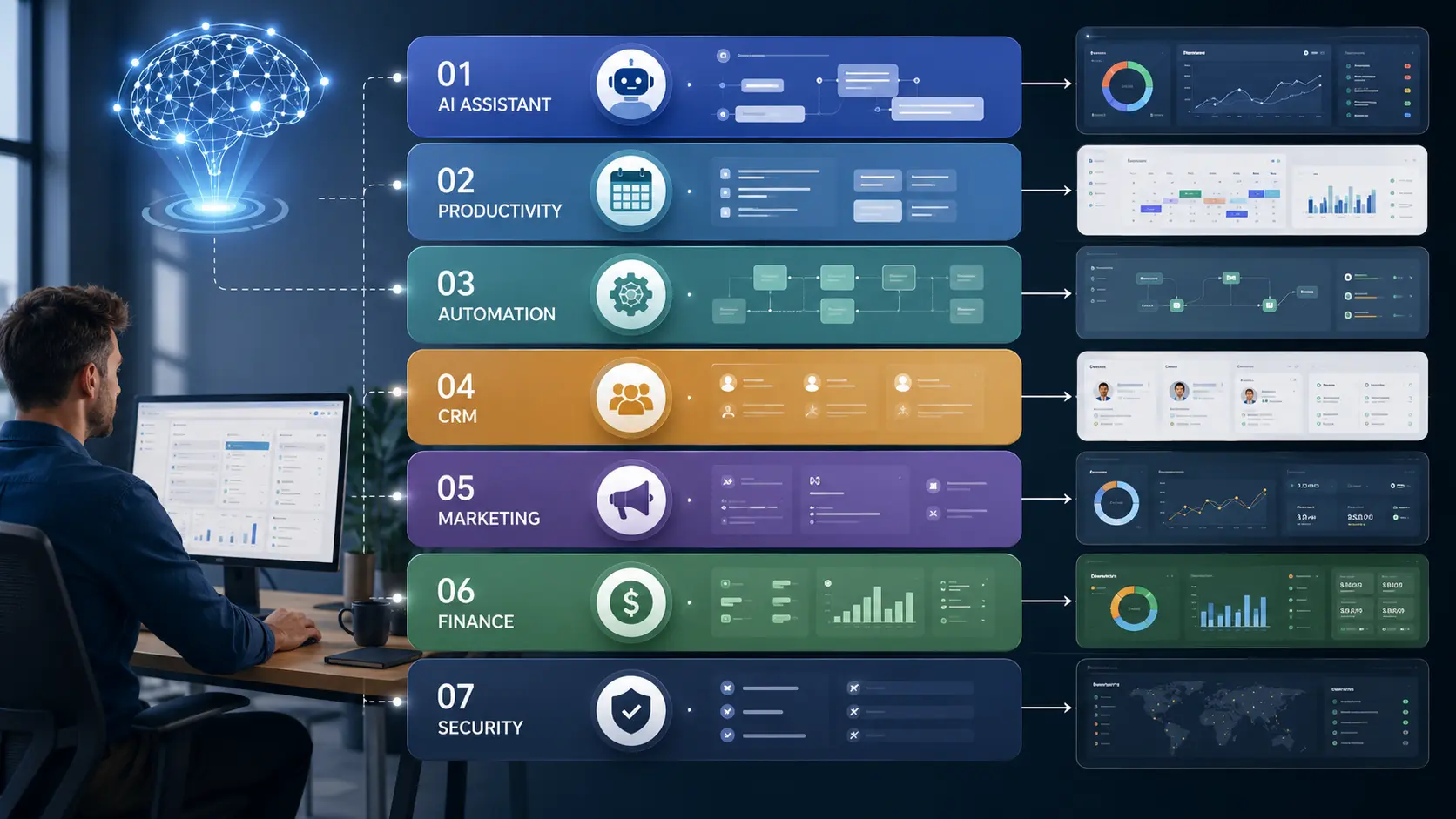
There isn’t one perfect stack for every company, but a useful model can be divided into seven layers.
| Layer | Primary purpose | Example approach |
|---|---|---|
| AI assistant | Writing, research, analysis and reasoning | Business AI assistant |
| Productivity | Email, documents, storage and meetings | Google Workspace or Microsoft 365 |
| Automation | Connect apps and eliminate repetitive work | Zapier or similar platform |
| Customer management | Leads, contacts and sales pipeline | CRM |
| Marketing | Content, email, design and campaigns | AI + existing marketing tools |
| Finance | Accounting, payments and reporting | Dedicated accounting software |
| Security | Identity, backups and access control | Security-focused tools |
The key is that AI sits across the stack rather than becoming another isolated application.
1. The AI Brain
The first component is a business-grade AI assistant. This becomes the general-purpose layer employees can use for tasks that previously required several specialized tools or manual work.
For example, employees might use it to:
- Draft proposals
- Summarize long documents
- Analyze spreadsheets
- Research competitors
- Prepare meeting agendas
- Turn notes into emails
- Create first drafts of marketing content
- Brainstorm product ideas
- Review customer feedback
- Generate internal documentation
- Help with basic coding or technical tasks
ChatGPT Business, for example, is currently listed by OpenAI at $20 per user per month when billed annually, with a $25 monthly price, and requires at least two users. OpenAI also says the Business workspace includes centralized administration, usage controls, integrations and a secure workspace.
For a five-person team, that would put the baseline annual-billing subscription at roughly $100 per month. That is not enough to replace every business application. But it can potentially eliminate a collection of smaller AI subscriptions.
The important caveat
Don’t give employees unlimited freedom to paste sensitive information into random consumer AI tools. Customer records, financial information, confidential contracts, employee data and proprietary business information deserve clear handling rules. AI governance becomes more important as usage expands.
2. Make Your Existing Productivity Suite Work Harder
A surprising amount of business software exists because basic office work is fragmented.
Email happens in one application.
Documents live somewhere else.
Meetings are recorded separately.
Notes are stored in another application.
AI is increasingly being built directly into productivity suites, which can reduce that fragmentation.
Google Workspace, for example, currently includes Gemini capabilities across products such as Gmail, Docs, Meet and other Workspace applications, depending on the plan. Google lists Business Standard at $14 per user per month at its standard price, while promotional pricing may differ.
That matters because you’re not simply buying an AI chatbot.
You’re buying AI inside tools employees already use.
Imagine a salesperson finishing a customer meeting.
Instead of:
- Finding the recording
- Listening to the conversation
- Writing notes
- Updating the CRM
- Drafting a follow-up email
AI may be able to handle much of the preparation and drafting.
A human still reviews the information.
But the administrative burden can shrink.
3. Automation Is Where the Stack Gets Interesting
AI can generate an answer.
Automation can make something happen.
That’s an important distinction.
Consider a simple workflow:
Website form → lead captured → information classified → CRM updated → salesperson notified → personalized email drafted.
Without automation, someone may touch several systems manually.
With an automation platform, much of that movement can happen automatically.
Zapier, for example, currently offers a free plan and a Professional plan starting at $19.99 per month when billed annually. Its paid plans support multi-step workflows, premium applications, webhooks and AI-related features.
The actual cost can rise with usage, so businesses shouldn’t assume the advertised starting price is their final bill.
The larger point is that automation can connect AI to the software you already own.
That’s where the stack starts behaving like a system rather than a collection of subscriptions.

What AI Can Potentially Replace
The biggest savings often come from smaller tools.
These are applications that perform one narrow task and don’t contain critical business data.
For example:
AI writing tools
If your primary AI assistant already produces high-quality drafts, you may not need a separate writing assistant for every employee.
Meeting transcription
If your productivity platform already provides reliable AI meeting notes, a separate transcription subscription may be redundant.
Basic research tools
An AI research workflow can sometimes reduce the need for several lightweight research subscriptions.
Simple document tools
AI can help turn notes into proposals, summaries, reports and internal documents.
Basic content production
AI combined with a design platform can reduce the need for several single-purpose content tools.
Simple data cleanup
AI can help categorize, summarize and transform structured information, although sensitive or high-stakes data should receive appropriate human review.
The important word is potentially.
If a specialized tool performs a mission-critical function extremely well, deleting it just because AI exists may be a mistake.
What AI Should Probably Not Replace
The $1,000 AI stack becomes dangerous when cost-cutting turns into “AI replaces everything.”
There are areas where dedicated software remains valuable.
Accounting and tax systems
Businesses should not casually replace accounting systems with a chatbot.
AI can explain financial concepts, categorize information and assist with analysis, but bookkeeping, tax reporting, payroll and financial controls often require specialized systems and professional oversight.
Core CRM databases
If your CRM contains years of customer history, sales records, permissions and reporting, it isn’t simply a writing tool.
AI can sit on top of the CRM.
That doesn’t mean the CRM should disappear.
Cybersecurity
Don’t replace security infrastructure with an AI assistant.
Security requires identity management, access controls, monitoring, backups, endpoint protection and other safeguards.
Legal and compliance systems
AI can help summarize documents or identify questions.
That isn’t the same as legal advice or compliance assurance.
Industry-specific software
A dental practice, construction company, manufacturer and law firm have very different operational requirements.
A general-purpose AI assistant won’t automatically understand every regulatory, operational or safety requirement involved.
The $1,000 Budget: One Example
Here’s one illustrative model for a small company with several employees.
| Category | Illustrative monthly allocation |
|---|---|
| Business AI assistants | $150 |
| Productivity suite | $150 |
| Automation | $100 |
| CRM | $150 |
| Marketing/design | $150 |
| Accounting/finance | $150 |
| Security, backups and miscellaneous tools | $150 |
| Total | $1,000 |
These are planning allocations, not quoted market prices.
Actual software pricing varies by provider, number of employees, billing cycle, usage, features and promotions.
The interesting part is what happens when you compare this model with a fragmented stack.
A company might previously have spent $1,500 or $2,000 a month on a dozen specialized applications.
The goal isn’t necessarily to cut the bill to exactly $1,000.
The goal is to identify whether the company can get equal or better operational coverage with fewer overlapping subscriptions.
A Better Way to Decide What to Cancel
Before canceling software, make a spreadsheet.
Seriously.
Create five columns:
| Software | Monthly Cost | Main Job | Used How Often? | AI Replacement Possible? |
|---|---|---|---|---|
| Tool A | $50 | Meeting notes | Daily | Yes |
| Tool B | $100 | CRM | Daily | No |
| Tool C | $30 | Content writing | Weekly | Possibly |
| Tool D | $75 | Automation | Daily | No |
| Tool E | $40 | Design | Weekly | Partially |
Then classify every application.
Keep
The software is mission-critical, heavily used and difficult to replace.
Consolidate
Another platform can perform most of the same functions.
Replace
AI or another existing platform can reasonably handle the job.
Eliminate
The team barely uses it.
That last category is often overlooked.
Sometimes the easiest AI savings aren’t about AI at all.
They’re about canceling software nobody uses.
The Real Savings Come From Workflow Consolidation
Imagine a 15-person consulting company.
Before AI, a typical workflow might look like this:
A consultant receives an email.
They manually review attachments.
They copy information into notes.
A project manager creates a task.
Someone schedules a meeting.
The meeting gets recorded.
Another employee writes the summary.
Someone prepares a proposal.
A designer creates a presentation.
A salesperson sends the follow-up.
That’s a lot of handoffs.
Now imagine a more integrated process:
The email arrives.
AI categorizes the request.
Relevant documents are summarized.
A task is created automatically.
The meeting is scheduled.
AI generates meeting notes.
The CRM is updated.
A follow-up email is drafted.
The consultant reviews everything.
The human remains responsible for the decision.
But the number of manual steps falls.
That’s the real promise of the AI stack.
Not fewer buttons. Fewer handoffs.

Why the Human Still Matters
AI is very good at producing a first version.
Businesses still need people to determine whether that version is correct.
This is especially important in:
- Finance
- Healthcare
- Legal work
- Employment
- Security
- Customer disputes
- Public communications
- Contract negotiations
- High-value sales
A small business shouldn’t build a system where AI-generated output automatically becomes a customer-facing decision without appropriate review.
The more consequential the decision, the stronger the human oversight should be.
For low-risk work—such as brainstorming headline ideas—the review can be quick.
For a financial report or legal document, it should be much more serious.
How a Texas Business Might Use the Stack
Consider a hypothetical 12-person home-services company in Texas.
It doesn’t need an elaborate enterprise AI program.
It might use AI to:
- Draft estimates from technician notes
- Summarize customer calls
- Create follow-up messages
- Turn job information into social posts
- Analyze customer reviews
- Draft employee training documents
- Organize internal procedures
- Identify common service-request patterns
An automation layer could move leads from the website into the CRM and notify the appropriate employee.
The accounting system remains separate.
The CRM remains the source of truth for customer relationships.
AI becomes the productivity layer connecting everyday work.
That’s much more realistic than telling the owner to replace the entire business software environment with a chatbot.
How a New York Marketing Agency Might Use It
A small marketing agency has a different opportunity.
Its AI stack could focus heavily on:
- Research
- Content briefs
- Competitive analysis
- Proposal drafts
- Meeting summaries
- Client reporting
- Campaign ideas
- Data analysis
- Image concepts
- Internal knowledge
The agency may still keep specialized SEO, analytics, advertising and design software.
But several lightweight AI subscriptions could potentially be consolidated into one or two broader platforms.
For an agency selling expertise, the biggest value may not even be software savings.
It may be capacity.
If a five-person team can handle more client work without adding another full-time administrative role, that can be more valuable than saving $200 in subscriptions.
The Hidden Cost: AI Sprawl
There’s an ironic problem here.
AI is supposed to simplify software.
It can also create more software.
An employee discovers an AI note-taking tool.
Someone else signs up for a different writing assistant.
The marketing department buys an AI image generator.
Sales adopts another AI prospecting application.
IT discovers several browser-based AI tools being used without approval.
Six months later, the company has an entirely new form of software sprawl.
This is sometimes called shadow AI: employees using AI services outside the company’s approved technology environment.
The solution isn’t necessarily to ban AI.
A better approach is to establish an approved stack.
Give employees tools that are good enough to solve their problems.
Then create clear rules around:
- What data can be entered
- Which AI tools are approved
- Who can create automations
- How customer data is handled
- How AI-generated content is reviewed
- Who owns business accounts
- How access is removed when employees leave
Good governance can actually make AI adoption easier.
Don’t Forget Data Security
A $1,000 software budget is worthless if a company saves money by creating a security problem.
Before adopting an AI service, businesses should investigate:
- Data retention
- Data training policies
- Encryption
- User permissions
- Single sign-on
- Multi-factor authentication
- Administrative controls
- Audit logs
- Data export options
- Vendor security documentation
For example, OpenAI says ChatGPT Business does not train on business data by default and provides administrative and security controls such as SAML SSO and MFA.
Google similarly describes enterprise-grade security and says Workspace business data isn’t used to train its AI models or for advertising, subject to its published terms and product conditions.
Those policies are useful, but companies should still read the current terms and configure their accounts properly.
A secure product can still be misused by an employee with excessive access.
The Biggest Mistake: Buying AI Before Finding the Problem
The fastest way to waste $1,000 is to spend it on AI because everyone else is doing it.
Start with the workflow.
Ask:
Where are employees wasting time?
Then ask:
Is the problem caused by a lack of software, or by too many disconnected systems?
Then:
Can AI reduce the manual work without creating unacceptable risk?
Only after answering those questions should you buy anything.
A business that spends $300 a month on AI but saves 40 employee hours can have an excellent return.
A company that spends $1,000 on AI subscriptions nobody uses has simply created another software bill.
A Simple 30-Day AI Stack Experiment
You don’t need to transform the company overnight.
Try a 30-day experiment.
Week 1: Audit
List every software subscription.
Record:
- Cost
- Users
- Usage
- Main function
- Contract terms
- Renewal date
- Data stored there
Week 2: Find Overlap
Look for tools performing similar jobs.
Pay particular attention to:
- Writing
- Meeting notes
- Research
- Scheduling
- Design
- Data analysis
- Automation
Week 3: Test AI Workflows
Choose three repetitive processes.
For example:
- Customer inquiry → follow-up
- Meeting → notes → task
- Raw data → summary → report
Test the workflow with real but appropriately controlled business information.
Week 4: Measure
Compare:
- Time saved
- Errors
- Employee satisfaction
- Customer response time
- Software costs
- Revenue impact
- Quality
Then make the decision.
Keep what works.
Remove what doesn’t.
Is the $1,000 AI Stack Actually Worth It?
For many small businesses, the answer can be yes—but not because $1,000 is some magical threshold.
The opportunity is in software consolidation and labor leverage.
AI is becoming capable of handling a growing number of tasks that previously required separate applications or significant manual effort.
The U.S. business market is clearly moving in that direction, although adoption varies substantially by company size and industry. Census data shows that businesses with 250 or more employees have been adopting AI at considerably higher rates than the smallest firms.
That gap may create an interesting opportunity for smaller companies.
They don’t have to copy the technology budgets of large enterprises.
They can build smaller, more focused systems.
And because modern AI tools can perform multiple functions, a small company may be able to get more capability from a relatively compact software stack.
But the winning strategy isn’t “replace everything with AI.”
It’s:
Keep the systems that contain important business infrastructure. Add AI where it increases leverage. Remove redundant tools. Automate repetitive handoffs. Keep humans responsible for important decisions.
That’s a much more sustainable approach.

Frequently Asked Questions
What is a $1,000 AI stack?
A $1,000 AI stack is a planning framework in which a small business allocates roughly $1,000 per month to a focused combination of AI, productivity, automation, CRM, finance, marketing and security tools. It isn’t a fixed package or universal budget. Actual costs depend on the company’s size, industry, software requirements and usage.
Can AI really replace expensive business software?
Sometimes, but usually only partially. AI can replace or consolidate narrow tools used for writing, research, meeting notes, basic analysis, content creation and certain automation tasks. It generally shouldn’t be treated as a complete replacement for mission-critical systems such as accounting, CRM databases, cybersecurity infrastructure or specialized industry software.
How much can a small business save with AI?
There is no universal savings figure. A company may save money by eliminating redundant subscriptions, but the larger financial benefit can come from reducing manual work. The right measurement is total business impact—not simply the number of canceled software licenses.
What AI tools should a small business start with?
Start with one general-purpose business AI assistant, an existing productivity platform with AI capabilities, and an automation platform if repetitive workflows justify it. Then add specialized tools only when a real business requirement exists.
Is a $1,000 monthly software budget enough for a small business?
It can be enough for a relatively lean technology environment, but it depends heavily on the company. A five-person consulting firm and a 30-person manufacturing business have very different software requirements. The $1,000 figure should be treated as a budgeting framework rather than a promise that every company can operate within that amount.
Should a business cancel its CRM after adopting AI?
Usually not simply because it has AI. A CRM can contain customer records, sales history, reporting, permissions and workflows that an AI assistant doesn’t replace. AI may make the CRM more useful by automating data entry, summarizing interactions and assisting sales teams.
Is it safe to put business information into AI tools?
It depends on the specific product, account configuration, contract and type of information. Businesses should review vendor privacy and security policies before uploading confidential information. Sensitive data should be handled according to the company’s security, legal and regulatory requirements.
What is the biggest mistake businesses make with AI software?
Buying too many AI tools without identifying a specific business problem. AI subscriptions can create the same software sprawl they were supposed to solve. Start with workflows, measure results and consolidate tools whenever practical.
The Bottom Line
The most interesting thing about the $1,000 AI stack isn’t the number. It’s the philosophy behind it. Small businesses don’t need to win an arms race with enterprise technology departments. They need technology that makes the business easier to run. That means fewer repetitive tasks. Faster communication. Better use of existing data. Less administrative work. More time for customers and employees to do the things that actually require judgment.
AI can help with that. But the smartest businesses won’t simply pile AI subscriptions on top of everything they already have. They’ll audit their software, identify overlap, automate repetitive workflows and keep specialized systems where they genuinely add value. The goal isn’t to have the most AI. It’s to have the right AI doing useful work inside a lean technology stack. For a small U.S. business, that could make a $1,000 monthly technology budget feel much bigger than it looks on paper.

SoftwareCompanyNearMe Editorial Team is dedicated to researching and publishing trusted content about U.S. software companies, SaaS platforms, artificial intelligence (AI), cloud computing, cybersecurity, and enterprise technology. Our goal is to help businesses, IT professionals, and software buyers make informed decisions through accurate, well-researched, and regularly updated technology guides, company reviews, and industry insights.